 |
 |
 |
 |
|
|
Home | More Articles | Join as a Member! | Post Your Job - Free! | All Translation Agencies | |
|
|||||||
|
|
|
|
Website globalization - tips by A2Z Global Inc.
Though web production has matured rapidly over the years, the practice of web globalization is still very much in its infancy. Although nearly every American corporation now has a web presence, less than 15% offer more than one language. With so few examples to draw upon, and few established standards to reference, the assignment of planning a multilingual site can appear a daunting and overwhelming one.
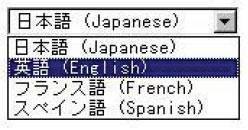
There is no magic bullet. However, there are a number of tips that will help you to avoid some of the common pitfalls while building your multilingual site. As with most things in life, the best way to learn is by actually doing it. As a localization agency that has been hired numerous times to help companies do this, allow me to share some tips that will eliminate a lot of frustration from your project. Test the water before diving in The most common mistake I have seen companies make is trying to do too much too quickly. Whether you want to add 10 pages in a dozen languages or 120 pages of one language, setting too ambitious a goal before fully understanding the many challenges involved is often a recipe for disaster. I can think back to one company who wanted to add seven languages to its English site simultaneously. They committed a substantial amount of money to creating a mirrored site in all target languages, only to discover that it had ignored the bandwidth limitations of each market. It was very difficult for users in several of the target countries to download the graphics-rich web pages. As a result, the company was forced to rebuild customized sites geared towards each market. And as well all know, having to “rebuild” always costs more money and more time. Instead of rolling out multiple languages at once, and risking problems in multiple countries, focus on one language at a time. The lessons you learn on managing the first language will save you time as you add languages. If you have a choice between beginning with a European or an Asian language, you may want to begin with European. Asian languages present more significant technical and linguistic challenges because they require “double-byte” character sets. K.I.S.S. Method > Keep It Simple Stupid Attempting to add too much functionality too quickly can also lead to trouble. As a rule, if you ease your way into web globalization you are better positioned to fine-tune development as you discover what works and what doesn’t. Just as most web sites have evolved in stages, the same philosophy applies to globalization. Basically, crawl before you try to walk. It works for babies. It works just as well for web globalization. Develop “Best practices” Keep in mind that globalization will impact many parts of your organization. Engage all departments that stand to be impacted by the addition of languages - such as customer service, fulfillment, and even finance. Create a process of feedback and refinement that all parties can benefit from. Once you do develop “best practices” for your site, adding languages becomes a manageable, scalable process. Make it easy to find If a person were to visit your site today, naturally you would make it simple to find the English version. In fact, it’s probably already in English. But how easy is it for them to find the other languages? Many organizations make it difficult for visitors to their English sites to find the multilingual equivalents. Every pixel of a web site represents valuable real estate. Providing users with a sign directing them to these multilingual sites (often called a “language gateway” or “locale gateway”) cuts into this precious real estate. Some organizations simply don’t plan for language gateways. Other organizations feel it is not necessary – often thinking “if someone is already viewing the English version of our site, why would they need to see the Japanese version?” Big mistake. If a user can’t quickly find a page (or word) that speaks their language, they will quickly move on to a site that does. Where’s the front door? With foreign sites in particular, the “front door” can often be ambiguous. For example, if you want to visit the Japanese Google site, you would go to www.google.co.jp. But if you wanted to visit the Japanese autobytel.com site, you would go to www.autobytel-japan.com. There is simply no one standard to finding the foreign web site of an American company. Some companies register foreign domains, others do not. To make matters worse, companies sometimes fail to promote their sites in foreign markets. Advertising and search engine registration is just as important abroad as in the US, if not more so. What about Gateways? Assuming you do want to build a language gateway, the next question is one of selecting the correct system. Opinions vary widely in this regard, though there are some general pros and cons to be aware of: Avoid flags While an array of Italian, Japanese, and French flags may seem like an easy (and colorful) solution, it often presents more problems than it solves. For example, how would you represent Spanish with one flag? And many flags could easily represent more than one language. Use a “welcome” mat If you’re only working with a few languages, try using small GIF images of a translated word, such as “Welcome” or the name of the language itself. This is an excellent approach, but it doesn’t scale well. Once you reach four languages you’ll find the GIFs taking up more and more room on your site. Let users “select” their language A third option is to use a pull-down menu, as shown here: Pull-down menus waste very little real estate, and they’re easily scaled. The tradeoff is that the menu can only display one word until it is activated. What word should that be, and in what language? Keep in mind, however, that certain languages won’t display without the correct fonts installed on the client browser.
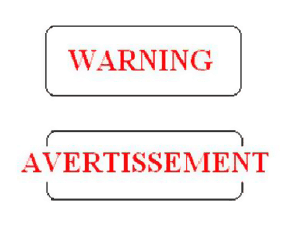
Frequent changes? Don’t embed it Some web sites will choose to embed their text in graphics – such as navigation buttons, logos, or banner ads. Though very attractive to the visitor, keep in mind that maintaining translated text in GIFs and JPEG files require much more time and resources. This is particularly true for Asian languages, as these languages require localized versions of Photoshop and double-byte fonts. If your text is constantly changing, you might want to have fewer graphics. By scaling back to a less graphics-intensive site, you accomplish two goals. You make the site load faster in the native country and you also make ongoing text management much easier. If this means redesigning the site, the time you invest now may save you time maintaining your site. Anticipate text expansion When working with embedded text, you must also consider text expansion and contraction. English does not translate to other languages on a 1:1 ratio. With European languages, the target text often expands by as much as 20%. Conversely, Asian target text often contracts. For example, when translating English to French, plan for a 15-20% expansion. This causes considerable problems, as shown in the following GIFs: When using embedded graphics, particularly with navigation bars, allot enough space so that the text can expand without impacting the overall design of the site.
Think local(e) A web site can be properly translated and still be confusing to the target market if it’s not well “localized.” For example, if you translate your site into Spanish, who exactly are you trying to reach? Spaniards? Mexicans? American-based Latinos? Localization entails tailoring the content to the specific requirements and needs of the local audience. Localize elements, including but not limited to:
Eestablish a global style Translation is a complex process. Some words translate well into other languages; other words simply do not translate at all. Brand names can be particularly troublesome. The age old story of Chevy Nova automobile is a classic example of a brand name meaning something totally inappropriate in Spanish. In Latin American, “nova” actually means “doesn’t go.” Many “Americanisms” and cliches also do not translate well in other languages. Examples:
Developing an international corporate style guide will save you and your translators a great deal of time and money. You may want to have more than one: one for EU and one for AP. Asia is much more graphic minded (cartoons are popular). This eliminates inconsistencies across languages and minimizes edits. Overall, don’t forget the following:
Keep the site manageable Before building a multilingual site, establish standards for file organization and naming. This will allow you to better manage files and images. There is no one “best” methodology to follow; it really comes down to what works best for your organization, your web management tools, and platform. However, the following represents a fairly popular and dependable approach, particularly for organizations in the early stages of multilingual web management. Directory names
This approach works well until you find yourself with Canadian French. In this case, to differentiate from European French, you simply add a two-letter country code to the prefix: “fr_CA.” Generally speaking, you should follow the naming codes that have been established by ISO. For a complete list of language codes please refer to: http://www.w3.org/WAI/ER/IG/ert/iso639.htm. File names File names in foreign languages use the naming convention of: johns software_ver2.3_Ja.qxd. Note that the Ja means this is the Japanese version and follows the ISO Language Code convention mentioned earlier. Without using a language code there is a danger that the files can become confused when localizing 20+ languages, especially if stored in the same directory. As a general rule, file names for foreign web pages should remain in English. This allows you and your team to know exactly what page you’re working with, even if you don’t speak the language. Don’t forget the U.S. Although you may translate into a number of languages, there is still a significant number of people within the U.S. who may also want to view the site - including many people within your organization. Make sure you understand how these pages will display on English web browsers. For double- byte and bi-directional languages such as Japanese, Chinese, Hebrew, and Arabic, you must have the proper fonts loaded (and possibly an enabled browser) to properly view these pages. (For Western European languages, this shouldn’t be a problem as English browsers share the same character set.) Not doing so could cause major backlash. Visitors to your website (including your co-workers) may assume something is wrong with the web page, when there isn’t. You might also want to craft a few “help” pages in English to guide users through the font downloading process. Updates and Support Over the years I’ve seen many companies localize their web sites while ignoring their email and phone support infrastructures. Whatever you do, please don’t make this mistake. Updating must be continuous. It can be easy to forget that a web site speaks to the world. Occasionally, the world is going to talk back. Ideally, when a company commits to a foreign market, it commits fully -- staffing up with people fluent in the appropriate languages to manage all aspects of customer service and marketing. This includes email, phone, and web-based help. This also includes installing localized operating systems and email software for testing and communication. Unfortunately, companies sometimes do not have the resources or foresight to commit to such an undertaking. Many companies will “edge” their way into foreign markets by merely localizing a web page or two and translating a few brochures. Then they find themselves reacting to customer service issues on a “crisis-by-crisis” basis. Prepare a plan and a budget with the help of your LSP(language service provider). More importantly, be clear on your web site as to what types of support are provided and what types of support aren’t. This sort of information is extremely helpful, and your website visitor will appreciate it. Use in-country language testers No matter how much you test your site, you won’t know effective it is until you test it in its target locale. Some companies utilize their foreign offices to help with testing, but believe it or not, this is actually not the best approach. The safest approach is to use dedicated, independent testers who can view the site with various modems, browsers, and systems. If you decide to outsource the testing, you ensure quality and consistency in the verification process by providing a detailed test plan. This should be based on the English test plan but enhanced to account for issues specific to translation and foreign languages. An alternative approach is to make sure your vendor carefully outlines everything that is being tested, including download times. Understanding Unicode Unicode is a “super” character set that allows for the representation of most of the world’s languages. The Windows operating system uses Unicode, and most major software developers either currently support Unicode. Current versions of browsers including Internet Explorer support Unicode. The only problem, of course, is that most of the world does not have the fonts to take full advantage of this encoding method. The Unicode standard is complex, but it is rapidly gathering popularity. If you plan on building a large, multilingual site, it’s worth the time to consider Unicode, especially if your site is database driven. For more information, visit www.unicode.org. Scripts are important Naturally, I saved the best for last -- all those pesky CGI, ASP, and other assorted scripts. They can cause real problems with a multilingual site if they contain hard-coded English text. For example, a Perl script used for form processing may be hard coded to respond to an error with an English response. Such details are often not easily discovered as scripts are often located in separate directories of the server (or on separate servers). Make sure your developer builds scripts that pull text from resource files, based on the language needed. This way, there is no risk of a Japanese user being thanked in English after submitting an order. Share your “story” Properly globalizing your website will pay huge dividends if you do business in other countries, but there is a lot to consider before you do it. These issues are complicated and constantly changing. If you’re still feeling a bit overwhelmed, or would simply like to share your story, feel free to drop me a line at tlandgren [at] a2zglobal . com. Author Founder and Managing Director of A2Z Global Inc, Theodora Landgren is a translation and localization expert who has been a pioneer in the industry. Her company, A2Z Global, has been providing high volume technical translations for international and global organizations since 1982. Ms. Landgren has lived and worked in the United States, Asia, and Europe for a combined 28 years and is currently an active subject matter guest speaker at many worldwide conferences on localization and internationalization.
Published - July 2009 ClientSide News Magazine - www.clientsidenews.com
E-mail this article to your colleague! Need more translation jobs? Click here! Translation agencies are welcome to register here - Free! Freelance translators are welcome to register here - Free! |
|
|
|
|
|
|
| |||
Legal Disclaimer Site Map |
 After
numerous meetings, conference calls, and strategy sessions,
your company has decided to go “global”. Or at least the
website! Before you run out and hire a globalization agency
to help with the process, you need to prepare. It’s a big
deal and let’s face it – you’ve never done it before. Don’t
worry, you’re not alone.
After
numerous meetings, conference calls, and strategy sessions,
your company has decided to go “global”. Or at least the
website! Before you run out and hire a globalization agency
to help with the process, you need to prepare. It’s a big
deal and let’s face it – you’ve never done it before. Don’t
worry, you’re not alone.
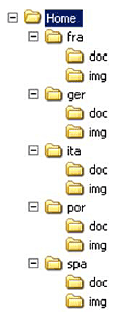 Notice
above how the language-specific pages are kept in separate
directories. To manage the content (both images and HTML
files), the directories are prefaced with a three-letter
language code:
Notice
above how the language-specific pages are kept in separate
directories. To manage the content (both images and HTML
files), the directories are prefaced with a three-letter
language code:

