|
 |
 |
 |
|
|
Home | More Articles | Join as a Member! | Post Your Job - Free! | All Translation Agencies | |
|
|||||||
|
|
|
|
Localizing Online Help: Robohelp vs. FlareBy Jean-Baptiste Daian,
jb.daian[at]ezglobe.com
For a long time, Adobe RoboHelp was the favorite among the help authoring tools despite its limited foreign language support. Recently, however, a relatively young competitor, Madcap Software, emerged with a fully Unicode-compliant, XML-based help authoring product - Flare - whose feature set and capabilities make localization easier and far more practical. At EzGlobe, our project with a technology company that required European and Asian localization served as the catalyst for comparing Adobe RoboHelp and MadCap Flare and their ability to support both European and Asian translations. THE ROBOHELP EXPERIENCE
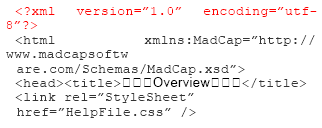
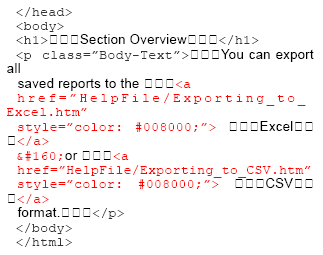
In translating the content to the Western European languages, the localization effort was fairly straightforward. The challenge lay with the Japanese version because RoboHelp did not support Asian languages. With no direct support, we had to find a creative workaround. The answer was to employ third-party tools to engage in a two-phase process. We first translated the RoboHelp-generated RTF and CNT files directly. Then we used the standard Microsoft WinHelp compiler to build the Japanese WinHelp. While workable, this solution was not completely satisfying. The added steps created challenges, and it demanded a number of extra engineering hours with a fair amount of creativity from our team to produce the help. Even with this effort, at the end, some characters such as the bullets, were corrupted, or it was impossible to retain the customer’s watermarked background. However, the most notable sacrifice was the inability to preserve the user-friendly side-by-side layout. As a result, the Japanese consumers ended up with a different and less inviting user experience. The final task was to generate the documentation in PDF from the same RoboHelp sources. Once again, due to RoboHelp’s lack of support for the Japanese language, our team had to find a workaround and use a third-party tool to create the PDF file from the help content. THE FLARE EXPERIENCE The chance to revisit our choice of help authoring tools came at the beginning of 2007 when the same client approached us for advice on a new product, which was to feature both Microsoft Compressed HTML Help (CHM) and WebHelp. Remembering the past challenges with the Japanese localization, they wanted a less complicated solution that would yield uniform results across the languages. We first looked at the new version of RoboHelp - RoboHelp 6 - which was released in January 2007. Although it had many feature enhancements, it still lacked support for Asian languages. Like our client, we had no interest in repeating the workarounds of the past project, and therefore, RoboHTML was quickly eliminated. At the same time, we had seen the good press that surrounded Madcap’s product, Flare 2.5, which had just been announced, and it provided full Unicode support for both single-byte and double-byte languages. It was time to give Flare a try. We decided to perform a trial localization project on a sample help system that was developed using Flare. The goal was to verify that the product would handle double-byte characters as advertised, that the files could be easily processed within the computer-aided translation (CAT) environment, and that generating CHM help and WebHelp would pose no difficulties. PSEUDO-LOCALIZATION The best way to test for localization readiness and capabilities is pseudo-localization. Pseudo-localization is a process by which a tool adds a prefix and a suffix of sample foreign characters to each discrete block of text. To pseudo-localize the sample help, we followed the standard localization process and first prepared the source files (HTML) for processing within the translation memory environment. Then, in a translation memory-ready RTF file, an engineer ran a script that prefixed and suffixed sample Japanese Kanji characters to each block of text. The following is a sample of a pseudo-localized RTF help file.
Next, we compiled the source files using the standard, Flare proprietary compiler and launched the help. The following screenshot shows the outcome: 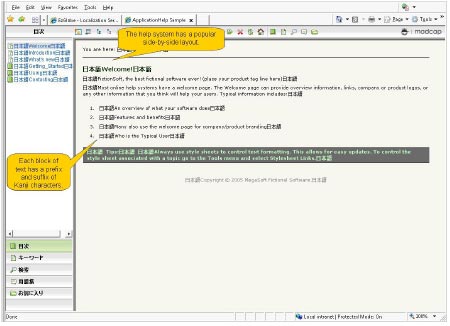
Pseudo-localization demonstrated that Flare’s output for double-byte languages retained the user-friendly side-by-side layout as the original help content. CONSISTENT OUTPUT ACROSS LANGUAGES MadCap Flare passed the pseudo-localization trial with flying colors. The Flare output offered the same user-friendly, side-by-side layout as the source help content, and there were no corrupted characters. Moreover, it provided fully functional index and search options. We knew we now had an option that would give our client’s Japanese users the same rich experience as the firm’s Western European customers. At the same time, Flare has provided a highly efficient, quality experience for our localization experts. Flare’s Unicode-based environment is language agnostic and allows for a quick and simple localization into many languages. Meanwhile, the product compiler yields a professionally looking and functional help. The XML-based environment plays nicely along with the computer-aided translation environment. Flare stores all content and project level files in the XML format. This makes the Flare projects and source files compatible with most of the favorite computer-aided translation tools. Using Flare, our team has the confidence that they can choose the best translation tool for the job, without worrying about compatibility. Flare also includes a Snippet library, which is a library of reusable content that can be included by reference. Snippets ensure consistency and decrease the localization cost because their content needs to be translated only once even if it is used in multiple locations. This effectively decreases the word count and thus the overall localization cost. Moreover, we were pleasantly surprised by Flare’s management of the indexing in translated help content. The keywords simply appeared as an attribute of an XML tag, making the translation work simple and the resulting translation consistent. Still, there was one more factor to consider. When you rely on a product to serve your clients, service and support can be nearly as important as the software itself. Although MadCap is a young company, the firm has enlisted a team of experienced help authoring support personnel, a number of them with more than a decade of experience. The support team’s knowledge and responsiveness reinforced our decision to recommend Flare. CONCLUSION A thorough test of the pseudo-localized sample help system has led our team to make MadCap Flare the help authoring tool of choice for help localization projects. Not only are we using the software ourselves, we have recommended Flare to many of our global customers who require authoring software capable of supporting the translation and localization of help content. We also have since begun to move forward with our technology client’s localization project where Flare continues to meet the expectations set by the results of our testing. The ability to eliminate workarounds for our Japanese localization, Flare’s ease of use, and its reusable snippets together are allowing us to realize a number of efficiencies throughout the localization process. Based on our current status, we expect to cut our project engineering time by at least 30 percent while delivering a consistent quality experience across all seven languages. And that translates into a better, more cost-effective product for our customer. Jean-Baptiste Daian is co-founder and president of EzGlobe, a full-service localization company that helps its clients go global by providing professional translation, localization, and internationalization services. He draws on more than 17 years experience in the localization industry. He can be reached at jb.daian@ezglobe.com. ClientSide News Magazine - www.clientsidenews.com
E-mail this article to your colleague! Need more translation jobs? Click here! Translation agencies are welcome to register here - Free! Freelance translators are welcome to register here - Free! |
|
|
|
|
|
|
| |||
Legal Disclaimer Site Map |
 Successful
companies know that the effort of translating content from
one language to another does not lie solely on the localization
teams. The right selection of authoring tools, as well as
the content development methodology, plays a crucial role
in global technical publication.
Successful
companies know that the effort of translating content from
one language to another does not lie solely on the localization
teams. The right selection of authoring tools, as well as
the content development methodology, plays a crucial role
in global technical publication.