|
 |
 |
 |
|
|
Home | More Articles | Join as a Member! | Post Your Job - Free! | All Translation Agencies | |
|
|||||||
|
|
|
|
Design and Development of Translator’s Workbench for English to Indian Languages
 Abstract
This paper describes the system design of a Translator's Workbench (TWB), built around the core concept of Translation Memory System (TMS), a method of capturing, storing and re-using translation. It examines the architectural, structural and procedural framework of the TWB with development details, including implementation essentials, to facilitate better understanding of the software system. The input to the software comes in the form of a formatted document in any of the software packages like MS-Word, Excel or PowerPoint and the output generated for the user is a translated document with the same formatting, providing an opportunity to the user to accept, edit or reject the translation. Thus, a possible solution to the problem of translating documents from English to Indian and other languages is provided. The paper envisages development in the field of translation from English to Hindi language only. However, the principles described here are also applicable to translation into other languages. Keywords: Translator's Workbench, Translation Memory, Document Filters. 1. Introduction Globally, more and more people are using computers.Because the English language is the dominating language in this field, the use of computers has, so far, been greatly restricted to those people who have some knowledge of English language. But to keep pace with the changing technology, many software companies worldwide, have developed software packages, enabling people to work in their own languages. With all these software packages around us, working in regional languages is now not a problem anymore. The problem arises when we need to translate the documents from English into a regional target language (Hindi). Doing the translation manually means typing the whole document again in Hindi, which takes a of time. Furthermore, besides the text, a document also contains elements like tables, images etc. and formatting, which needs to be maintained in the translated document. The solution proposed is the Translator's Workbench (TWB) [1], which is a sophisticated database system built around the core concept of Translation Memory Systems [2], a method of capturing, storing and re-using translation. TMS are a family of computer tools whose purpose is to facilitate re-use of existing translations. The goal is to systematically archive the translators' production as pairs of matching source-language and target-language segments. The linguistic database built by the TWB is known as the Linguistic Reminiscencer Database (LRD), which uses a similarity search algorithm to facilitate fast and efficient searching, using fuzzy matching techniques. When we encounter a sentence that is similar or identical to a sentence we have already translated, the TWB searches the LRD for the stored translation, giving us the option to accept, edit or reject it. As a result, the same sentence never needs to be translated afresh and we can re-use what we have stored in the Linguistic Reminiscencer Database (LRD). Key Terms Translation Record: Source language (L1) string with its Target language (L2) translation. Linguistic Reminiscencer Database (LRD): Database of translation records. Also known as Translation Memory. Translation Retrieval (TR): The process of retrieving translation(s) from the translation memory based on L1 similarity with the input. 2. Architectural Design of Translator's Workbench
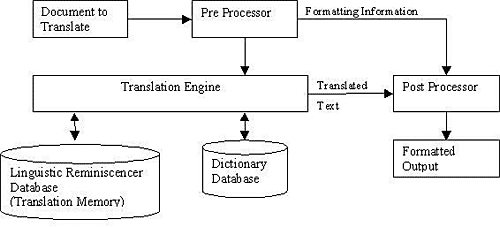
2.1. Pre-processing Module It uses the pre-processor filter to read out the text from the document. This module contains the following submodules: 2.1.1. Pre-processing of the document The document is pre-processed to find out the abbreviations, phrases like verb phrases or noun phrases, which occur together and should be recognized so that further processing on the document can be carried out accordingly. Thus the document is converted into a universal format. 2.1.2. Tokenization The pre-processed document is then tokenized. Thus, the multiword units of text are tokenized into single-word units. 2.2.Linguistic Reminiscencer Database and Dictionary Table Setups The sentences and the words, which have been pre-processed, are stored in the LRD and the Dictionary Tables, respectively, created for the project. Thus, the LRD and Dictionary Table setups are formulated for the translation process. 2.2.1. Dictionary Setup The Dictionary setup process (or module) retrieves only the needed words from the Master Dictionary and stores the meanings and other forms like part-of-speech, syntactic pattern, base form of the word, etc. into the new dictionary table created. 2. Linguistic Reminiscencer Database (LRD) Setup The LRD setup retrieves only the translation pairs from the Master Linguistic Reminiscencer Database. These translation pairs are retrieved using the LRD program, developed for looking up the LRD Table and finding the exact or fuzzy match. If the translation memory setup process gets a distant match, an Example Memory Setup is to be performed on the new document. A separate folder containing the sentences and words stored in the LRD and Dictionary Tables, respectively, is formulated, making the project ready for further processing. 2.3. Translation Module The translation process is executed using the two tables - LRD Table and the Dictionary Table, created for the project. 2.4. Post-Processing Module When translation is complete, it is post-processed to its original format (including layout). During post-processing, the documents are again opened and, for each sentence, formatting is looked up to create the final document. 2.5. Merging of Databases After post-processing, the LRD and Dictionary tables in the project's workspace are merged with the Master LRD and Master Dictionary Tables respectively, using the merge process. It saves time, if the same sentence comes up subsequently in any new project created by the user. For looking up the LRD, Multi-level Similar Segment Matching Algorithm for Translation Memories [3] is extended and adapted for Indian Languages. 3. Structural model of Translator's Workbench Data flow Diagrams (DFDs) [4] have proved helpful tools in providing the detailed structural design for any project by depicting the flow of data through the system. The DFD may be used to represent a system or software at any level of abstraction. In fact, DFDs may be partitioned into levels that represent increasing information flow and functional details. The DFD is also known as a Bubble Chart or a Data Flow Graph.3.1 Context Level DFD A Level 0 DFD, also called a fundamental system model or the context model, represents the entire software element as a single bubble with input and output data, indicated by incoming and outgoing arrows, respectively. 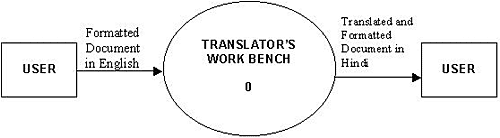
The input to the system is: Formatted document(s) in English: These are the files created in software like MS-Word, PowerPoint, Excel etc. The output from the system to the user is: Translated and Formatted document(s) in Hindi: After being translated to Hindi, the documents are recreated in the original format and output is given to the user. 2.2. Level 1 DFD The Context Level DFD is now expanded into level 1 to depict increased functionality.
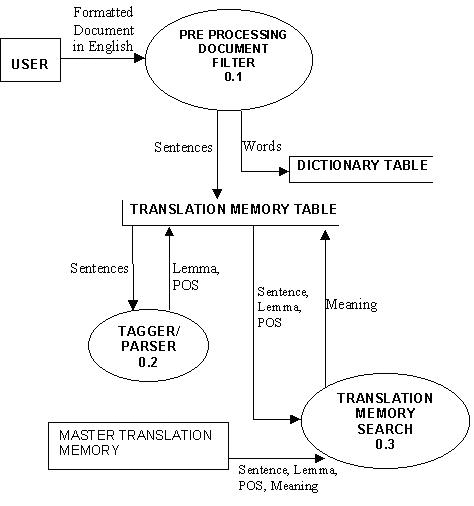
Figure 3: Level 1 DFD
Sentences from the Translation Memory table are then processed using Tagger/Parser resulting into Lemma & POS forms of the sentences, which are sent back to the Translation memory table and stored. The Sentences inserted into the Translation Memory Table are then searched using Translation Memory module from the Master Translation Memory Table. Meanings of the sentences found are inserted into the Translation Memory in the Project's Workspace.
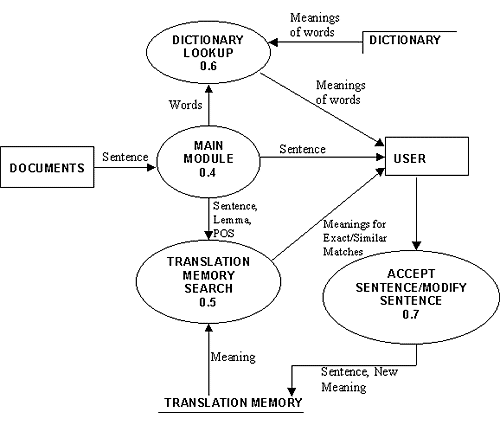
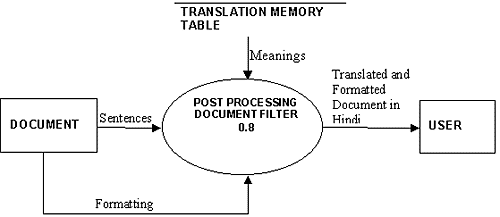
Figure 4: Main Module DFD The Main Module reads the document and for each sentence looks up the Translation Memory Table & Dictionary table created in the Project's workspace. It displays the sentence, its meaning and the meaning of the constituent words. The user is thus given option to edit, accept or reject the results displayed. The final sentence and its meaning are inserted into the Translation Memory table. The sentences and formatting instructions are passed to the Post-Processing Document Filter. The Post-Processing Document Filter generates the final translated document by using the Translation Memory table.
Figure 5: Post Processing DFD 4. Development of TWB It involves methodology and its implementation concepts, used to develop the software system. 4.1. MSSM Algorithm For Translation Memory For looking up the Translation Memory, Multi-level Similar Segment Matching Algorithm for Translation Memories [3] is used. This algorithm is extremely efficient for retrieving the best example in Translation Memory Systems. The algorithm uses F (=3) different levels of data (Surface words, Lemmas, Parts of speech (POS)) in a combined and uniform way. The purpose of the algorithm is to match two segments of words: input I and candidate C. 4.2. Document Filters Document Filters are the programs that are used to read out plain text from the formatted documents. Two kinds of document filters have been developed:
For reading out text from the documents like MS-Word, Excel and PowerPoint, Automation [5], a concept of COM has been used. AutomationAutomation (formerly called OLE Automation) is a technology that allows software packages to expose their unique features to scripting tools and other applications. Automation uses the Component Object Model (COM), but may be implemented independently from other OLE features, such as in-place activation. We can automate any object that exposes an automation interface, providing methods and properties that you can access from other applications. The automated object might be local or remote (on another machine accessible across a network). Local automation has been used in the development of this system. Many commercial applications, such as Microsoft Word, Excel and Microsoft Visual C++, allow you to automate much of their functionality. An Automation client is an application that can manipulate exposed objects belonging to another application. This is also called an Automation controller. An Automation server is an application that exposes programmable objects to other applications. This is sometimes also called an "Automation component." The server application exposes Automation objects. These Automation objects have properties and methods as their external interface. Properties are named attributes of the Automation object. Properties are like the data members of a C++ class. Methods are functions that work on an Automation object. Methods are like the public member functions of a C++ class. The automation objects are exposed in the form of type libraries which have extensions as .dll, .tlb, .olb, .exe etc. Like for MS-Word XP the type library is MSWORD.OLB, for MS-PowerPoint XP it is MSPPT.OLB, and for MS-Excel XP it is EXCEL.EXE. These are imported into the system for using the objects provided by them. As we import them using Class Wizard feature in VC++, two files a .cpp file and a .h file are created for each of them which contain details of the interfaces provided by them in terms of classes, their properties and their methods to manipulate them. Hence, declaring the objects and using the defined properties, COM OLE is enabled. 4.3. Database Implementation ActiveX Data Object (ADO) is used to simplify database programming. ActiveX Data Objects enables us to write a client application to access and manipulate data in a source through a provider. ActiveX Data Objects contains all the functionality of OLE DB. ADO's primary benefits are its ease of use, high speed, low memory overhead, and a small disk footprint. There are three ways to manipulate ADO within VC++.
In the development of this TWB System, database programming is done by using the #import method. 5. Conclusion TWB makes translation of documents faster. The software is designed to enhance the Human Translation Effort, not to replace it, and it is quite different from Machine Translation Software, which aims to replace the Human Effort for the translation. The software stores matching source and target language segments that have been translated in a database, for future re-use. Newly encountered segments are compared to the database content, and the resulting output (exact, fuzzy or no match) is reviewed and completed by the translator. As the translation effort progresses, the LRD grows. Thus, the proposed design of TWB provides a tool that helps to save total translation time by reducing repetition and increasing accuracy. 6. References [1] www.trados.com: Translator's Workbench User Guide. [2] A MultiCorpora White Paper, 2002] "The Full-Text Multilingual Corpus: Breaking the translation Memory bottleneck", Multicorpora R&D Inc., www.multicorpora.com. [3] Planas, Furuse "Multi-level Similar Segment Matching Algorithm for Translation Memories and Example-Based Machine Translation." [4] "Software Engineering A Practitioner's Approach" by Pressman. [5] http://support.microsoft.com/ for Articles for Creating Automation Projects using MFC and Type Library.
|
|
|
|
|
|
|
| |||
Legal Disclaimer Site Map |